
Training Statistics#
This tutorial demonstrates how to read and visualize training statistics from JaQMC computations. You’ll learn how to:
Run a computation and understand the output directory structure
Read statistics from CSV for quick analysis
Read statistics from HDF5 for full data access
Visualize training progress with plots
We’ll use a simple hydrogen atom as our example system.
Extra Packages
This tutorial uses pandas, h5py, and matplotlib for data analysis and plotting.
If you’re working from a JaQMC repository clone:
uv sync --group analysis
If you’re using JaQMC in your own environment:
pip install pandas h5py matplotlib
Setup#
First, let’s import the necessary modules. We’ll need:
pandas for reading CSV files
h5py for reading HDF5 files
matplotlib for visualization
JaQMC modules for running computations
import shutil
from pathlib import Path

import h5py
import matplotlib.pyplot as plt
import pandas as pd

from jaqmc.app.molecule import MoleculeTrainWorkflow
from jaqmc.utils.config import ConfigManager
We’ll use a temporary directory for this tutorial. Any previous runs in the notebook’s execution directory will be cleaned up automatically.
WORKING_DIR = Path("runs/jaqmc_tutorial_stats")

if WORKING_DIR.exists():
    shutil.rmtree(WORKING_DIR)
WORKING_DIR.mkdir(parents=True)
1. Running a Computation#
First, let’s run a short VMC training on a hydrogen atom. We’ll use a small network and few iterations to keep this tutorial quick. If you prefer the CLI, the equivalent command would look like:
jaqmc molecule train --yml tutorial-train.yml
Here, tutorial-train.yml stands for a YAML config with the same settings as the Python ConfigManager(...) configuration shown below. Here we use the Python API which is more convenient in notebooks.
cfg = ConfigManager(
    {
        "system": {
            "atoms": [{"symbol": "H", "coords": [0.0, 0.0, 0.0]}],
            "electron_spins": [1, 0],
        },
        "workflow": {"batch_size": 256, "save_path": str(WORKING_DIR)},
        "wf": {"hidden_dims_single": [64, 64], "hidden_dims_double": [16, 16]},
        "pretrain": {"run": {"iterations": 100}},
        "train": {"run": {"iterations": 100}},
    }
)

workflow = MoleculeTrainWorkflow(cfg)
workflow()  # Run the workflow
2. Understanding the Output Directory Structure#
After training, JaQMC creates a structured output directory. Let’s explore it:
def show_tree(path, prefix=""):
    """Display directory tree structure."""
    path = Path(path)
    contents = sorted(path.iterdir())
    for i, item in enumerate(contents):
        is_last = i == len(contents) - 1
        connector = "└── " if is_last else "├── "
        print(f"{prefix}{connector}{item.name}")
        if item.is_dir():
            extension = "    " if is_last else "│   "
            show_tree(item, prefix + extension)

print(f"Output directory: {WORKING_DIR}\n")
show_tree(WORKING_DIR)
Output directory: runs/jaqmc_tutorial_stats

├── config.yaml
├── pretrain_ckpt_000099.npz
├── pretrain_stats.csv
├── pretrain_stats.h5
├── train_ckpt_000099.npz
├── train_stats.csv
└── train_stats.h5
Key outputs:
config.yaml- The resolved configuration used for this runtrain_ckpt_*.npz- Checkpoint files containing parameters and walker statestrain_stats.h5- HDF5 file with training statistics (energy, variance, etc.)train_stats.csv- CSV file with the same statistics for easy analysis
3. Reading from CSV (Simple)#
The CSV file is the easiest way to access training statistics. It can be loaded directly with pandas:
stats_csv = pd.read_csv(WORKING_DIR / "train_stats.csv")
print(f"Training statistics shape: {stats_csv.shape}")
print(f"Available columns: {list(stats_csv.columns)}")
stats_csv.tail()
Training statistics shape: (100, 9)
Available columns: ['step', 'energy:kinetic', 'energy:kinetic_var', 'energy:potential', 'energy:potential_var', 'loss', 'pmove', 'total_energy', 'total_energy_var']
| step | energy:kinetic | energy:kinetic_var | energy:potential | energy:potential_var | loss | pmove | total_energy | total_energy_var | |
|---|---|---|---|---|---|---|---|---|---|
| 95 | 95 | 0.432470 | 0.450123 | -0.930039 | 0.484411 | -0.497570 | 0.894922 | -0.497570 | 0.003411 |
| 96 | 96 | 0.458515 | 0.753072 | -0.964574 | 0.932186 | -0.506059 | 0.895703 | -0.506059 | 0.017372 |
| 97 | 97 | 0.481538 | 1.637891 | -1.001980 | 2.553002 | -0.520442 | 0.901953 | -0.520442 | 0.120001 |
| 98 | 98 | 0.486978 | 0.854024 | -0.993042 | 1.129227 | -0.506064 | 0.894922 | -0.506064 | 0.032736 |
| 99 | 99 | 0.474010 | 0.535505 | -0.970379 | 0.582647 | -0.496368 | 0.887500 | -0.496368 | 0.003371 |
Let’s summarize the final training results:
print("Training summary:")
print(f"  Total iterations: {len(stats_csv)}")
print(f"  Final energy: {stats_csv['total_energy'].iloc[-1]:.6f} Ha")
print(f"  Final energy variance: {stats_csv['total_energy_var'].iloc[-1]:.6f} Ha²")
print(f"\n  (Exact H atom: -0.5 Ha)")
Training summary:
  Total iterations: 100
  Final energy: -0.496368 Ha
  Final energy variance: 0.003371 Ha²

  (Exact H atom: -0.5 Ha)
4. Reading from HDF5 (Full Data)#
The HDF5 file contains the same data but is more efficient for large datasets and provides direct array access:
with h5py.File(WORKING_DIR / "train_stats.h5", "r") as f:
    print("HDF5 datasets:")
    for key in f.keys():
        print(f"  {key}: shape={f[key].shape}, dtype={f[key].dtype}")

    # Load specific datasets into memory
    loss_history = f["loss"][:]
    total_energy_history = f["total_energy"][:]
HDF5 datasets:
  energy:kinetic: shape=(100,), dtype=float32
  energy:kinetic_var: shape=(100,), dtype=float32
  energy:potential: shape=(100,), dtype=float32
  energy:potential_var: shape=(100,), dtype=float32
  loss: shape=(100,), dtype=float32
  pmove: shape=(100,), dtype=float32
  total_energy: shape=(100,), dtype=float32
  total_energy_var: shape=(100,), dtype=float32
5. Visualizing Training Progress#
Let’s create some plots to visualize the training convergence.
Energy and Variance#
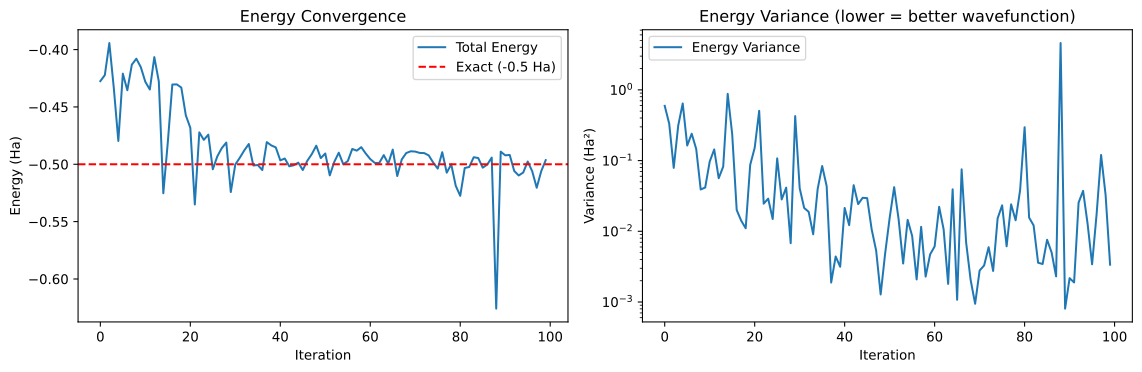
The total energy should converge toward the exact value (-0.5 Ha for hydrogen). The energy variance measures wavefunction quality - lower variance indicates a better ansatz:
fig, axes = plt.subplots(1, 2, figsize=(12, 4))

ax = axes[0]
ax.plot(stats_csv["total_energy"], label="Total Energy")
ax.axhline(y=-0.5, color="r", linestyle="--", label="Exact (-0.5 Ha)")
ax.set_xlabel("Iteration")
ax.set_ylabel("Energy (Ha)")
ax.set_title("Energy Convergence")
ax.legend()

ax = axes[1]
ax.semilogy(stats_csv["total_energy_var"], label="Energy Variance")
ax.set_xlabel("Iteration")
ax.set_ylabel("Variance (Ha²)")
ax.set_title("Energy Variance (lower = better wavefunction)")
ax.legend()

plt.tight_layout()
plt.show()
Energy Components#
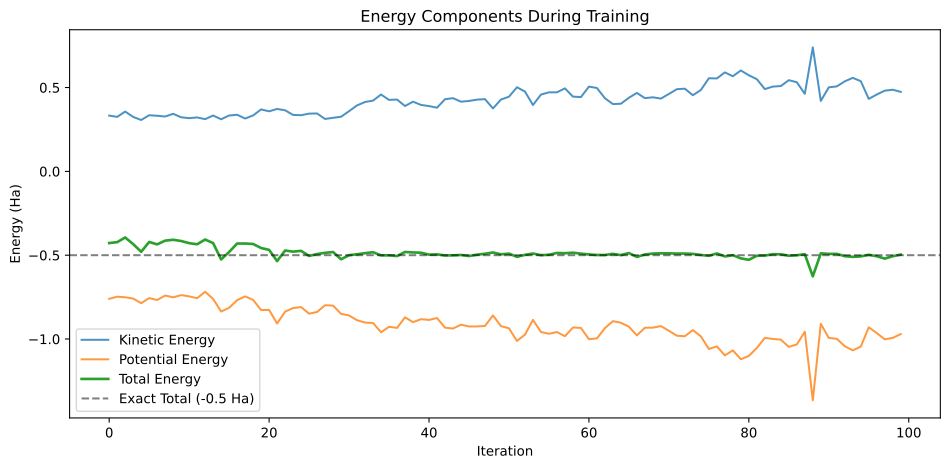
We can also visualize the kinetic and potential energy separately. For hydrogen, the virial theorem states that \(\langle T \rangle = -\langle V \rangle / 2 = 0.5\) Ha at the exact solution:
fig, ax = plt.subplots(figsize=(10, 5))

ax.plot(stats_csv["energy:kinetic"], label="Kinetic Energy", alpha=0.8)
ax.plot(stats_csv["energy:potential"], label="Potential Energy", alpha=0.8)
ax.plot(stats_csv["total_energy"], label="Total Energy", linewidth=2)
ax.axhline(y=-0.5, color="k", linestyle="--", alpha=0.5, label="Exact Total (-0.5 Ha)")

ax.set_xlabel("Iteration")
ax.set_ylabel("Energy (Ha)")
ax.set_title("Energy Components During Training")
ax.legend()

plt.tight_layout()
plt.show()
MCMC Acceptance Rate#
The acceptance rate (pmove) measures how often proposed electron moves are accepted. Values in 0.3–0.7 are acceptable; the sampler auto-tunes the step width to keep pmove in the 0.50–0.55 target range:
fig, ax = plt.subplots(figsize=(8, 4))

ax.plot(stats_csv["pmove"], label="Acceptance Rate")
ax.axhline(y=0.5, color="r", linestyle="--", alpha=0.5, label="Target range")
ax.axhline(y=0.55, color="r", linestyle="--", alpha=0.5)
ax.fill_between(range(len(stats_csv)), 0.5, 0.55, alpha=0.2, color="green", label="Optimal range")

ax.set_xlabel("Iteration")
ax.set_ylabel("Acceptance Rate")
ax.set_title("MCMC Acceptance Rate")
ax.set_ylim(0, 1)
ax.legend()

plt.tight_layout()
plt.show()
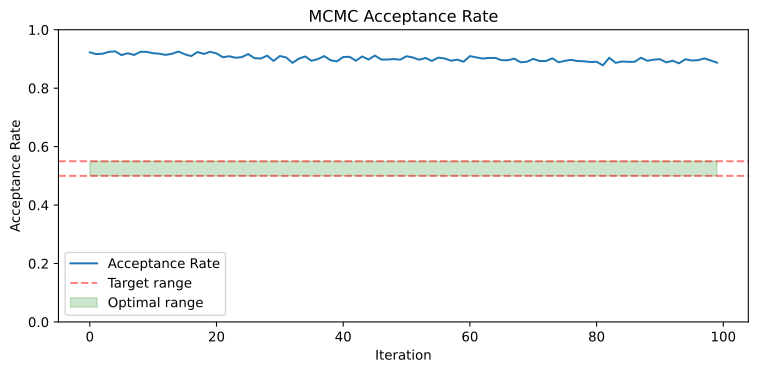
Note on acceptance rate: Short training runs (like this 100-iteration tutorial) often show acceptance rates above the optimal range. Don’t worry — JaQMC uses an adaptive step size strategy that automatically adjusts the MCMC proposal step size. In longer production runs, the acceptance rate gradually stabilizes within the target range.
Reporting Energies#
When reporting VMC energies (e.g., in a paper), keep the following in mind:
Discard the burn-in period. The first portion of training is far from converged. Only use the final 10–20% of steps for energy estimates.
Average over steps. The mean of
total_energyover the selected window gives your variational energy estimate.Statistical error. Each training step’s energy is correlated with neighboring steps because the MCMC walkers evolve continuously. A naive standard error (standard deviation / \(\sqrt{N}\)) will underestimate the true uncertainty. For publication-quality error bars, use block averaging (also called “blocking analysis”): group consecutive steps into blocks, compute the mean energy per block, and take the standard error of those block means. Increase the block size until the standard error plateaus — that plateau value is the correct statistical uncertainty.
Evaluation stage. For the most reliable final energy, run a separate evaluation (no parameter updates) after training is complete. This avoids any bias from ongoing optimization. See Analyzing Evaluations for a full walkthrough.
Summary#
In this tutorial, we learned how to:
Run a JaQMC computation and locate the output files
Read CSV files with pandas for quick data exploration
Read HDF5 files for efficient access to large datasets
Visualize training progress including energy convergence, variance, and MCMC acceptance rates
For running evaluation with proper error bars, see Analyzing Evaluations. For directly evaluating the wavefunction on custom configurations, see Analyzing Wavefunctions.