
Analyzing Evaluations#
Training optimizes the wavefunction, but the energy estimates it produces are biased by ongoing parameter updates. An evaluation run fixes the parameters, draws fresh MCMC samples, and accumulates statistics over many steps — giving you unbiased energy estimates with proper error bars.
This tutorial walks through:
Running an evaluation from a training checkpoint
Understanding the output files and directory structure
Loading the digest for final energy results
Estimating statistical error from per-step data using block averaging
Extracting density from histogram estimators
Prerequisites: This tutorial assumes familiarity with running JaQMC computations. See Training Statistics for basics.
Extra Packages
This tutorial uses h5py, matplotlib, and pyblock for data analysis and plotting.
If you’re working from a JaQMC repository clone:
uv sync --group analysis
If you’re using JaQMC in your own environment:
pip install pandas h5py matplotlib
We’ll use the built-in hydrogen atom example, which has a single variational parameter and an exact ground-state energy of \(-0.5\) Ha. We deliberately undertrain the wavefunction so that the energy variance is large enough to clearly demonstrate the reblocking analysis.
Setup#
import shutil
from pathlib import Path

import h5py
import matplotlib.pyplot as plt
import numpy as np
import pyblock.blocking

from jaqmc.app.hydrogen_atom import (
    hydrogen_atom_eval_workflow,
    hydrogen_atom_train_workflow,
)
from jaqmc.utils.config import ConfigManager
Matplotlib is building the font cache; this may take a moment.
WORKING_DIR = Path("runs/jaqmc_tutorial_eval")

if WORKING_DIR.exists():
    shutil.rmtree(WORKING_DIR)
WORKING_DIR.mkdir(parents=True)
1. Training (to generate a checkpoint)#
We run a very short VMC training (10 iterations) to create an undertrained checkpoint. This keeps the energy variance high, making the error analysis more illustrative. If you prefer the CLI, the equivalent command would look like:
jaqmc hydrogen_atom train --yml tutorial-train.yml
Here, tutorial-train.yml stands for a YAML config with the same settings as the Python ConfigManager(...) configuration shown below. Here we use the Python API which is more convenient in notebooks.
train_cfg = ConfigManager(
    {
        "workflow": {
            "batch_size": 256,
            "save_path": str(WORKING_DIR / "train"),
            "seed": 0,
        },
        "train": {"run": {"iterations": 10}},
    }
)

train_workflow = hydrogen_atom_train_workflow(train_cfg)
train_workflow()
2. Running Evaluation#
Evaluation uses a separate workflow — hydrogen_atom_eval_workflow — that loads trained parameters from a checkpoint and runs MCMC sampling without updating the wavefunction. The key config difference is workflow.source_path, which points to the training run directory (or a specific checkpoint file). If you prefer the CLI, the equivalent command would look like:
jaqmc hydrogen_atom evaluate --yml tutorial-eval.yml
Here, tutorial-eval.yml stands for a YAML config with the same settings as the Python ConfigManager(...) configuration shown below.
Tip
Evaluation stage keys (run.*, sampler.*, writers.*) live at the config root, not under a train.* prefix.
eval_cfg = ConfigManager(
    {
        "workflow": {
            "batch_size": 256,
            "save_path": str(WORKING_DIR / "eval"),
            "source_path": str(WORKING_DIR / "train"),
            "seed": 1,
        },
        "run": {
            "iterations": 2000,
            "burn_in": 100,
        },
        "estimators": {
            "enabled": {"density": True},
            "density": {"axes": {"z": {"range": [-6, 6]}}},
        },
    }
)

eval_workflow = hydrogen_atom_eval_workflow(eval_cfg)
eval_workflow()
The burn_in parameter re-equilibrates the walkers under the fixed wavefunction before collecting statistics.
3. Understanding the Output#
Let’s look at what evaluation produced:
def show_tree(path, prefix=""):
    path = Path(path)
    contents = sorted(path.iterdir())
    for i, item in enumerate(contents):
        is_last = i == len(contents) - 1
        connector = "└── " if is_last else "├── "
        print(f"{prefix}{connector}{item.name}")
        if item.is_dir():
            extension = "    " if is_last else "│   "
            show_tree(item, prefix + extension)

print(f"Evaluation output: {WORKING_DIR / 'eval'}\n")
show_tree(WORKING_DIR / "eval")
Evaluation output: runs/jaqmc_tutorial_eval/eval

├── config.yaml
├── evaluation_ckpt_001999.npz
├── evaluation_digest.npz
└── evaluation_stats.h5
Key files:
evaluation_digest.npz— Final observables averaged over all evaluation steps. This is the main result.evaluation_stats.h5— Per-step statistics written by the internal HDF5 writer. Used for digest computation and for the block analysis shown below.evaluation_ckpt_*.npz— Checkpoint for resuming an interrupted evaluation.config.yaml— The resolved configuration.
4. Loading the Digest#
The digest contains the final energy estimate — averaged over all evaluation steps. This is typically what you report:
digest = dict(np.load(WORKING_DIR / "eval" / "evaluation_digest.npz"))

print("Digest contents:")
for key, value in sorted(digest.items()):
    if value.ndim == 0:
        print(f"  {key}: {value:.6f}")
    else:
        print(f"  {key}: shape={value.shape}")
Digest contents:
  density: shape=(100,)
  density:n_steps: 2000.000000
  energy:kinetic: 0.582323
  energy:kinetic_var: 1.437306
  energy:potential: -1.079188
  energy:potential_var: 1.231630
  total_energy: -0.496865
  total_energy_var: 0.007937
print(f"Energy estimate:  {digest['total_energy']:.6f} Ha")
print(f"Energy variance:  {digest['total_energy_var']:.6f} Ha²")
print(f"\n  (Exact H atom: -0.5 Ha)")
Energy estimate:  -0.496865 Ha
Energy variance:  0.007937 Ha²

  (Exact H atom: -0.5 Ha)
Understanding the Digest Fields#
The _var fields record the average per-step variance of the local energy across walkers — not the variance of the step-averaged energy. Concretely, each evaluation step computes Var(E_local) over walkers, and the digest averages those per-step variances over all steps. This quantity measures wavefunction quality: an exact eigenstate would have zero variance regardless of how many steps you run.
Because this is a per-step variance (not a variance of the final mean), you cannot directly use it as an error bar on the reported energy. For that, you need block analysis on the per-step mean energies — see the next section.
5. Estimating Statistical Error#
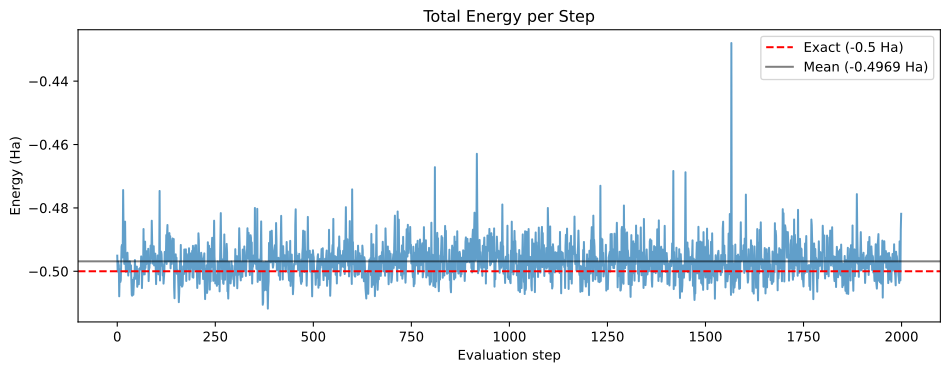
The evaluation stage writes per-step statistics to evaluation_stats.h5. Each entry is the walker-averaged energy for one evaluation step. Since consecutive MCMC steps are correlated, a naive standard error (\(\sigma / \sqrt{N}\)) underestimates the true uncertainty.
Block averaging (also called “reblocking”) handles this by repeatedly averaging neighbouring pairs of data points until the samples become uncorrelated. We use pyblock to automate this analysis.
Note
If you use pyblock to analyse data for an academic publication, please cite it: James Spencer, pyblock, jsspencer/pyblock.
with h5py.File(WORKING_DIR / "eval" / "evaluation_stats.h5", "r") as f:
    print("Per-step statistics:")
    for key in sorted(f.keys()):
        print(f"  {key}: shape={f[key].shape}, dtype={f[key].dtype}")

    total_energy = f["total_energy"][:]
Per-step statistics:
  energy:kinetic: shape=(2000,), dtype=float32
  energy:kinetic_var: shape=(2000,), dtype=float32
  energy:potential: shape=(2000,), dtype=float32
  energy:potential_var: shape=(2000,), dtype=float32
  total_energy: shape=(2000,), dtype=float32
  total_energy_var: shape=(2000,), dtype=float32
fig, ax = plt.subplots(figsize=(10, 4))
ax.plot(total_energy, alpha=0.7)
ax.axhline(y=-0.5, color="r", linestyle="--", label="Exact (-0.5 Ha)")
ax.axhline(
    y=np.mean(total_energy), color="k", linestyle="-", alpha=0.5,
    label=f"Mean ({np.mean(total_energy):.4f} Ha)",
)
ax.set_xlabel("Evaluation step")
ax.set_ylabel("Energy (Ha)")
ax.set_title("Total Energy per Step")
ax.legend()
plt.tight_layout()
plt.show()
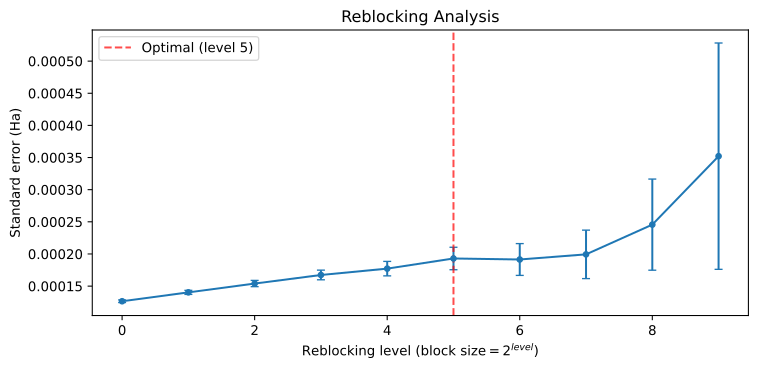
Now apply pyblock’s reblocking analysis. reblock returns a list of BlockTuple results at increasing block sizes; find_optimal_block identifies where the standard error has converged:
reblock_data = pyblock.blocking.reblock(total_energy)
opt = pyblock.blocking.find_optimal_block(len(total_energy), reblock_data)

if opt:
    optimal = reblock_data[opt[0]]
    print(f"Optimal block level: {opt[0]}")
    print(f"  Block size:     2^{opt[0]} = {2**opt[0]} steps")
    print(f"  Mean energy:    {optimal.mean:.6f} Ha")
    print(f"  Std error:      {optimal.std_err:.6f} Ha")
    print(f"  Std error err:  {optimal.std_err_err:.6f} Ha")
    print(f"\n  Energy: {optimal.mean:.6f} ± {optimal.std_err:.6f} Ha")
else:
    print("Could not find optimal block (too few data points).")
    print("Using the largest available block level instead.")
    largest = reblock_data[-1]
    print(f"\n  Energy: {largest.mean:.6f} ± {largest.std_err:.6f} Ha")
Optimal block level: 5
  Block size:     2^5 = 32 steps
  Mean energy:    -0.496865 Ha
  Std error:      0.000193 Ha
  Std error err:  0.000017 Ha

  Energy: -0.496865 ± 0.000193 Ha
We can also visualize how the standard error estimate grows with block size and plateaus once the autocorrelation is accounted for:
block_levels = np.arange(len(reblock_data))
std_errs = np.array([r.std_err for r in reblock_data])
std_err_errs = np.array([r.std_err_err for r in reblock_data])

fig, ax = plt.subplots(figsize=(8, 4))
ax.errorbar(block_levels, std_errs, yerr=std_err_errs, marker="o", markersize=4, capsize=3)
if opt:
    ax.axvline(x=opt[0], color="r", linestyle="--", alpha=0.7, label=f"Optimal (level {opt[0]})")
    ax.legend()
ax.set_xlabel("Reblocking level ($\\mathrm{block\\ size} = 2^{level}$)")
ax.set_ylabel("Standard error (Ha)")
ax.set_title("Reblocking Analysis")
plt.tight_layout()
plt.show()
Tip
The standard error should plateau as the block size grows — the plateau value is the correct statistical uncertainty. If it keeps rising without levelling off, run more evaluation steps.
6. Extracting Density#
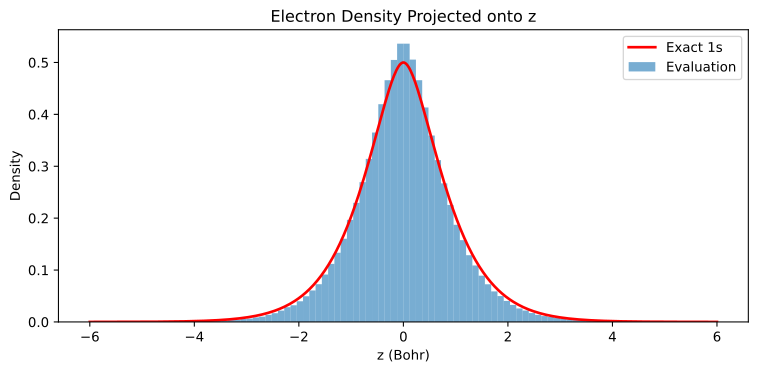
We enabled the density estimator when configuring the evaluation. For the hydrogen atom, this defaults to a CartesianDensity estimator that projects electron positions onto the z-axis (100 bins over \([-8, 8]\) Bohr). We overrode the range to \([-6, 6]\) via estimators.density.axes.z.range in the config. The result appears in the digest as raw counts that we need to normalize ourselves.
density_raw = digest["density"]
n_steps = digest["density:n_steps"]
print(f"Raw histogram shape: {density_raw.shape}")
print(f"Total counts:        {density_raw.sum():.0f}")
print(f"Evaluation steps:    {n_steps}")
Raw histogram shape: (100,)
Total counts:        511997
Evaluation steps:    2000
The histogram records how many times an electron landed in each bin, summed over all walkers and steps. To convert to a probability density, divide by the total counts and the bin width:
z_min, z_max, n_bins = -6.0, 6.0, len(density_raw)
bin_width = (z_max - z_min) / n_bins
bin_centers = np.linspace(z_min + bin_width / 2, z_max - bin_width / 2, n_bins)

density = density_raw / (density_raw.sum() * bin_width)
For the hydrogen 1s orbital \(\psi = \frac{1}{\sqrt{\pi}} e^{-r}\), the exact density projected onto z is \(n(z) = (|z| + \tfrac{1}{2})\, e^{-2|z|}\). Since our wavefunction is undertrained, we expect a broader distribution:
z_fine = np.linspace(z_min, z_max, 500)
exact_nz = (np.abs(z_fine) + 0.5) * np.exp(-2 * np.abs(z_fine))

fig, ax = plt.subplots(figsize=(8, 4))
ax.bar(bin_centers, density, width=bin_width, alpha=0.6, label="Evaluation")
ax.plot(z_fine, exact_nz, "r-", linewidth=2, label="Exact 1s")
ax.set_xlabel("z (Bohr)")
ax.set_ylabel("Density")
ax.set_title("Electron Density Projected onto z")
ax.legend()
plt.tight_layout()
plt.show()
Summary#
In this tutorial, we learned how to:
Run evaluation by pointing
source_pathat a training directoryRead the digest (
evaluation_digest.npz) for final energy estimatesInterpret digest fields — the
_varfields measure wavefunction quality, not the error of the meanEstimate statistical error from per-step HDF5 data using pyblock’s reblocking analysis
Extract and normalize density from histogram estimators in the digest
For reading training output, see Training Statistics. For computing custom observables, inspecting per-walker local energies, and evaluating the wavefunction on arbitrary configurations, see Analyzing Wavefunctions.